Overview and Background
Starting a Flux Instance and Interacting with Flux provide recipes for starting Flux and navigating a hierarchy of Flux instance that do not require administrator privilege or configuration. It may be helpful to develop some perspective on Flux in these contexts before configuring a Flux system instance.
Flux Architecture
A Flux instance consists of one or more Flux brokers communicating over a tree-based overlay network. Most of Flux's distributed systems and services that aren't directly associated with a running job are embedded in the flux-broker(1) executable or its dynamically loaded plugins.
Flux may be used in single-user mode, where a Flux instance is launched as a parallel job, and the instance owner (the user that submitted the parallel job) has control of, and exclusive access to, the Flux instance and its assigned resources. On a system running Flux natively, batch jobs and allocations are examples of single user Flux instances.
When Flux is deployed as the system instance, or native resource manager on
a cluster, its brokers still run with the credentials of a non-privileged
system user, typically flux. However, to support multiple users and
act as a long running service, it must be configured to behave differently:
The Flux broker is started directly by systemd on each node instead of being launched as a process in a parallel job.
The systemd unit file passes arguments to the broker that tell it to use system paths for various files, and to ingest TOML files from a system configuration directory.
A single security certificate is used for the entire cluster instead of each broker generating one on the fly and exchanging public keys with PMI.
The Flux overlay network endpoints are statically configured from files instead of being generated on on the fly and exchanged via PMI.
The instance owner is a system account that does not correspond to an actual user.
Users other than the instance owner (guests) are permitted to connect to the Flux broker, and are granted limited access to Flux services.
Users connect to the Flux broker's AF_UNIX socket via a well known system URI if FLUX_URI is not set in the environment.
Job processes (including the Flux job shell) are launched as the submitting user with the assistance of a setuid root helper on each node called the IMP.
Job requests are signed with MUNGE, and this signature is verified by the IMP.
The content of the Flux KVS, containing system state such as the set of drained nodes and the job queue, is preserved across a full Flux restart.
The system instance functions with some nodes offline.
The system instance has no initial program.
The same Flux executables are used in both single user and system modes, with operation differentiated only by configuration.
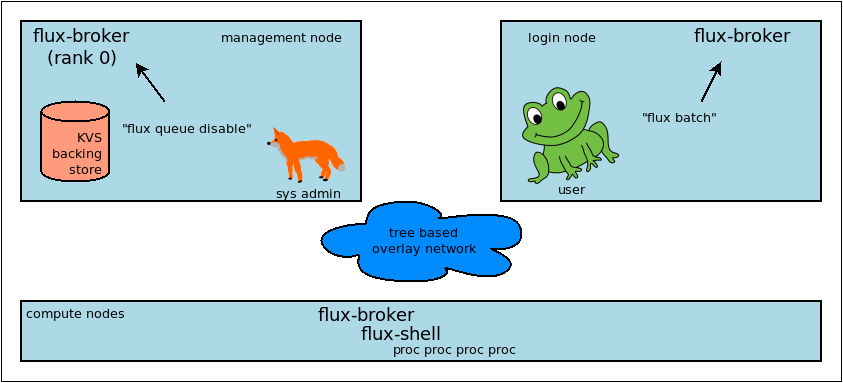
Fox prevents Frog from submitting jobs on a cluster with Flux as the system resource manager.
Software Components
Flux was conceived as a resource manager toolkit rather than a monolithic project, with the idea to make components like the scheduler replaceable. In addition, several parts of flux can be extended with plugins. At this time the primary component types are
- broker modules
Each broker module runs in its own thread as part of the broker executable, communicating with other components using messages. Broker modules are dynamically loadable with the flux-module(1) command. Core services like the KVS, job manager, and scheduler are implemented using broker modules.
- jobtap plugins
The job manager orchestrates a job's life cycle. Jobtap plugins extend the job manager, arranging for callbacks at different points in the job life cycle. Jobtap plugins may be dynamically loaded with the flux-jobtap(1) command. An example of a jobtap plugin is the Flux accounting multi-factor priority plugin, which updates a job's priority value when it enters the PRIORITY state.
- shell plugins
When a job is started, the flux-shell(1) is the process parent of job tasks on each node. Shell plugins extend the job environment and can be configured on a per-job basis using the
--setoptoption of flux-run(1) and related job submission commands.affinity,pmi, andptyare examples of Flux shell plugins.- connectors
Flux commands open a connection to a particular Flux instance by specifying a URI. The scheme portion of the URI may refer to a native connection method such as
localorssh. Native connection methods are implemented as plugins called connectors. See flux_open(3).- URI resolver plugins
Other URI schemes must be resolved to a native form before they can be used. Resolvers for new schemes may be added as plugins. For example, the
lsfresolver plugin enables LSF users to connect to Flux instances running as LSF jobs by specifying alsf:JOBIDURI. See flux-uri(1).- validator plugins
Jobs may be rejected at ingest if their jobspec fails one of a set of configured validator plugins. The basic validator ensures the jobspec conforms to the jobspec specification. The
feasibilityplugin rejects job that the scheduler determines would be unable to run given the instance's resource set. Therequire-instanceplugin rejects jobs that do not run in a new Flux instance. See flux-config-ingest(5).- frobnicator plugins
The frobnicator allows a set of configured plugins to modify jobspec at submission time. For example the
defaultsplugin sets configured default values for jobspec attributes such as duration and queue. See flux-config-ingest(5).
Independently developed Flux components are generally packaged and versioned separately. Each package may provide one or more of the above components as well as man pages and flux(1) subcommands. At this stage of Flux development, it is good practice to combine only contemporaneously released components as the interfaces are not stable yet.
File Formats and Data Types
Since some parts of Flux are developed independently, some effort has been made to standardize file formats and data types to ensure components work together and provide a consistent user experience. System administrators may find it useful to be aware of some of them.
- hostlist
A compact way of representing an ordered list of hostnames, compatible with legacy tools in use at LLNL and defined by RFC 29.
- idset
A compact way of representing an unordered set of integers, defined by RFC 22.
- TOML
Tom's Oblivious Minimal Language is the file format used in Flux configuration files.
- JSON
Javascript Object Notation is used throughout Flux in messages and other file formats.
- eventlog
An ordered log of timestamped events, stored in the Flux KVS and defined by RFC 18. Eventlogs are used to record job events, capture standard I/O streams, and record resource status changes.
- FSD
Flux Standard Duration, a string format used to represent a length of time, defined by RFC 23.
- jobspec
- R
A resource set (JSON), defined by RFC 20.
- FLUID
Flux Locally Unique ID, used for Flux job IDs, defined by RFC 19.
Security
The Flux brokers that make up a system instance are started on each node by
systemd. The brokers run as an unprivileged system user, typically flux.
This user is termed the instance owner. The instance owner has complete
control of the Flux instance.
A tree-based overlay network is established among brokers, rooted at the
management node. This network is secured and encrypted using the
ZeroMQ CURVE mechanism. This requires
a single CURVE certificate to be generated and installed on all nodes,
typically /etc/flux/system/curve.cert, before Flux begins operation.
The certificate must be readable by the instance owner but should be carefully
protected from access by other users since disclosure could allow overlay
network security to be bypassed.
On each node, users and tools may connect to the local system instance broker
via a UNIX domain socket at a well known location, usually /run/flux/local.
Users are authenticated on this socket using the SO_PEERCRED socket option.
Once connected, a user may inject messages into the overlay network. Messages
are stamped by the broker at ingress with the user's authenticated userid,
and a role mask that identifies any special capabilities granted to the user.
Messages that are sent by the flux user are stamped with the instance owner
role, while other users, or guests, are stamped with a role that grants
minimal access. Note that the root user is considered a guest user with
no special privilege in Flux, but sites can choose to grant root the owner
role by configuration if desired. See flux-config-security(5).
Messages are used for remote procedure calls. A Flux service may allow or deny an RPC request depending on its message rolemask or userid. For example, only the instance owner can drain a node because the drain service only allows drain request messages that have the owner role. Similarly, any job can be canceled by a cancel request message with the owner role, but in addition, jobs can be canceled by guests whose message userid matches the target job userid.
A Flux job is launched when brokers launch one flux-shell(1) per node with the credentials of the user that submitted the job. When that is a guest user, Flux employs a setuid helper called the flux-imp(8) to launch the shells with the guest credentials. The shells in turn launch one or more user processes that compose the parallel job.
The IMP is restricted by configuration to only allow the flux user to run
it, and to only launch the system Flux job shell executable. In addition, job
requests are signed by the submitting user with
MUNGE, and the IMP verifies this signature
before starting the shells. The current working directory of the job, the
environment, and the executable command line are examples of job request data
protected by the MUNGE signature.
When Flux starts a batch job or allocation, it starts an independent, single-user Flux instance with brokers running as the submitting user. The new instance owner has complete control over this Flux instance, which cannot use the IMP to launch jobs as guests, and does not permit guests to connect to its UNIX domain sockets. Its overlay network is also secured with the ZeroMQ CURVE mechanism, but instead of starting with a shared certificate read from disk, each broker generates a certificate in memory on the fly, then exchanges public keys and socket endpoints with peer brokers using the PMI service offered by the Flux shells of the enclosing instance. In other words, the single-user Flux instance bootstraps like an MPI parallel program.
Overlay Network
As described above, a Flux instance consists of one or more Flux brokers communicating over a tree-based overlay network. A Flux system instance on a cluster runs one broker per node. The brokers connect to each other using TCP in a static tree topology, which is selected by configuration files. The broker at the tree root is the "leader". The others are "followers".
The leader is critical. If it goes down, the entire Flux instance must restart. Moreover, an unclean shutdown could result in lost job data. Therefore, it is desirable to arrange for the leader to run on a management node or other protected server that does not run user workloads.
To a lesser degree, non-leaf follower (internal) nodes are also critical. If they are shut down or crash, the subtree rooted at that node must restart. However, the Flux instance continues and no data should be lost as long as the leader is unaffected.
Note
At this time, when a node's broker restarts, any jobs running on the node receive a fatal exception. This will be addressed in a future release of Flux that allows job shells to reconnect to the broker after it restarts. For now, it means that restarting the leader affects all running jobs, and restarting a non-leaf follower affects all jobs running on the subtree.
The network used for the overlay network should be chosen for stability, as network partitions that persist long enough can cause downstream nodes to be declared lost. This has the same effect as crashing. Shorter partitions may cause nodes to be marked "torpid" and taken offline temporarily. On a cluster, the conservative choice is usually a commodity Ethernet rather than a high speed interconnect. Note, however, that partition tolerance can be tuned when the network has known issues. See flux-config-tbon(5).
Topology for Small Clusters
The overlay topology can be configured in any tree shape. Because of the criticality of internal nodes, the flat tree with no internal nodes has appeal for smaller clusters up to a few hundred nodes. The downsides of a flat configuration, as the cluster size increases are:
The leader must directly manage all follower TCP connections. For example, it must iterate over all of them to publish (broadcast) a message.
The memory footprint of the leader node may grow large due to per-peer message queues.
The advantages of hierarchical KVS caching are lost. For example, when starting a large job, the leader node must directly service each peer lookup request for the same job data.
These extra overheads may affect the responsiveness of services that are only present on the leader node, such as the job manager and the scheduler.
The second example in flux-config-bootstrap(5) is a flat topology.
Topology for Large Clusters
To avoid the above downsides, larger clusters should use a custom topology with tree height of 2 and internal brokers assigned to stable, well connected, non-busy nodes. The downside of this topology is, obviously:
More brokers are critical
The third example in flux-config-bootstrap(5) is a topology with a tree height of 2.