15/Independent Minister of Privilege for Flux: The Security IMP
This specification describes Flux Security IMP, a privileged service used by multi-user Flux instances to launch, monitor, and control processes running as users other than the instance owner.
Name |
github.com/flux-framework/rfc/spec_15.rst |
Editor |
Mark A. Grondona <mgrondona@llnl.gov> |
State |
raw |
Language
The key words “MUST”, “MUST NOT”, “REQUIRED”, “SHALL”, “SHALL NOT”, “SHOULD”, “SHOULD NOT”, “RECOMMENDED”, “MAY”, and “OPTIONAL” in this document are to be interpreted as described in RFC 2119.
Introduction
In the traditional resource management model, a monolithic resource manager runs with the credentials of a privileged user, typically using long-running daemons with elevated privileges on compute resources. These daemons allow the resource manager to complete necessary privileged work, such as modification of containers, system preparation (such as prolog/epilog scripts), and most importantly allow the transition of credentials to that of the requesting user, so that jobs may be successfully executed in a multi-user environment.
Drawbacks to this monolithic approach include:
Total amount of code running with privilege is increased above what is strictly necessary
Testing of privileged code is more difficult
Security patches and updates require a new release of entire project
In the Flux model, however, an instance runs at most with the credentials of the instance owner (a normal, unprivileged user), including all processes running on computational resources of the instance. This design works well for single-user instances of Flux, but multi-user capable instances require some mechanism to perform privileged operations, most notably when executing work on behalf of a non instance owner (a guest).
In the Flux system, this privilege - along with all related operations - is contained within a single service, the Independent Minister of Privilege (IMP), which is responsible for allowing instance owners to run work on behalf of a guest when the guest user has authorized the instance to do so.
By placing all code running with elevated privilege into a single service, the following benefits are realized:
Code running under privilege is reduced to the logical minimum
The privileged service can be tested separately from other Flux components
The privileged software release cycle is decoupled from core Flux code, allowing updates to be applied out of band.
The privileged service is completely under sysadmin control, while still allowing users to run test or private versions of Flux even in multi-user mode.
More fine grained administrative control of privilege. For example, simple filesystem access controls may be used to limit which users are allowed to run multi-user without preventing these users from launching Flux instances altogether.
Arbitrary users can run multi-user instances of Flux, thus allowing users to share their jobs
User Roles
For the purposes of this RFC there are four main user roles:
- owner, instance owner, or resource owner
The user under which a Flux instance is running, not privileged. This user is considered the owner of all resources to which the Flux instance is running.
- system owner
The user under which the system instance of Flux is running. The default owner of all resources on the system.
- guest user, or guest
A user wishing to use services or run work in a Flux instance when they are not the instance owner.
- superuser, or root
A user with access to perform required privileged operations during multi-user execution, such as gaining credentials of other users, system setup or initialization, container manipulation, etc. Typically the root user.
Implementation Requirements
The Flux Security IMP SHALL be implemented with the following overall design
The IMP SHALL be an independent Flux Framework project, with the ability to be tested standalone
The IMP SHALL be implemented as an executable, flux-imp, which MAY be installed with setuid permissions in cases where multi-user Flux is required.
The IMP SHALL avoid putting sensitive data on the command line or environment.
Implementation of the IMP as a separately installed, setuid executable
allows sysadmin control over where and how the IMP is enabled. If the
flux-imp executable is not installed, or installed without
setuid bits enabled, then multi-user Flux is simply not available, though
single user instances of Flux will still operate. The file permissions,
access controls, or SELinux policy of flux-imp may also be
manipulated to restrict access to a user or group of users. For instance,
a site may configure permissions such that only a flux user has execute
permissions, thus allowing a multi-user system instance running as flux,
but disallowing sub-instance jobs access to multi-user capabilities.
Overall Design
When a guest makes a request for a job to a multi-user instance of Flux, the guest will create a message with information such as the job specification, a time-to-live, a uid, and an authorized resource owner, and then uses IMP client API to sign all fields of the message. The signed message becomes the user request token \(J\) which authorizes the resource owner to execute the request at some point on behalf of the guest.
This signed request then becomes part of the user’s job. When the job is scheduled by the instance, the owner assigns a resource set \(R\) to the job, and writes that information to the job record, marking the job as runnable.
The execution system within the instance then determines the set of resources on which an invocation of the IMP is required and creates a local resource set \(R_{local}\), which is necessarily disjoint for each IMP, and acts as a representation of the local resources to which the IMP should grant access to the guest user.
\(R_{local}\) and \(J\), along with other optional fields, are then concatenated and become input to the Flux IMP executable. The IMP verifies through local configuration and state that the instance owner has authority to grant access to resources in the local resource set, and verifies via \(J\) that the guest has authorized the resources owner to execute specific work on their behalf.
The IMP verifies the integrity and authenticity of \(J\) using cryptographic methods provided by plugins. Once the verification step is complete, the privileged IMP will invoke system configured plugins for setup and containment, then change credentials to the guest user, and finally execute the processes of the job as specified in \(J\).
In most cases, the IMP will execute a job shell on behalf of the user, passing the verified \(J\) as input to the shell. The shell itself is specified either by the user in \(J\) or by IMP configuration, but should not be provided or modified by the instance owner. The shell re-verifies integrity and authenticity of \(J\) before proceeding, then interprets the jobspec contained in \(J\) to determine the set of tasks to invoke on the current resource set.
Note
It may be noted that the user’s request \(J\) is verified twice when a job shell is invoked, and this is by design. The IMP verifies \(J\) to avoid passing tainted input to the job shell, which runs as the guest user. The shell re-verifies \(J\) because it has no guarantee that the caller has already done this verification, or that \(J\) has not been changed since any past verification.
Figure 1 below summarizes the overall role of the IMP in a multi-user Flux instance.
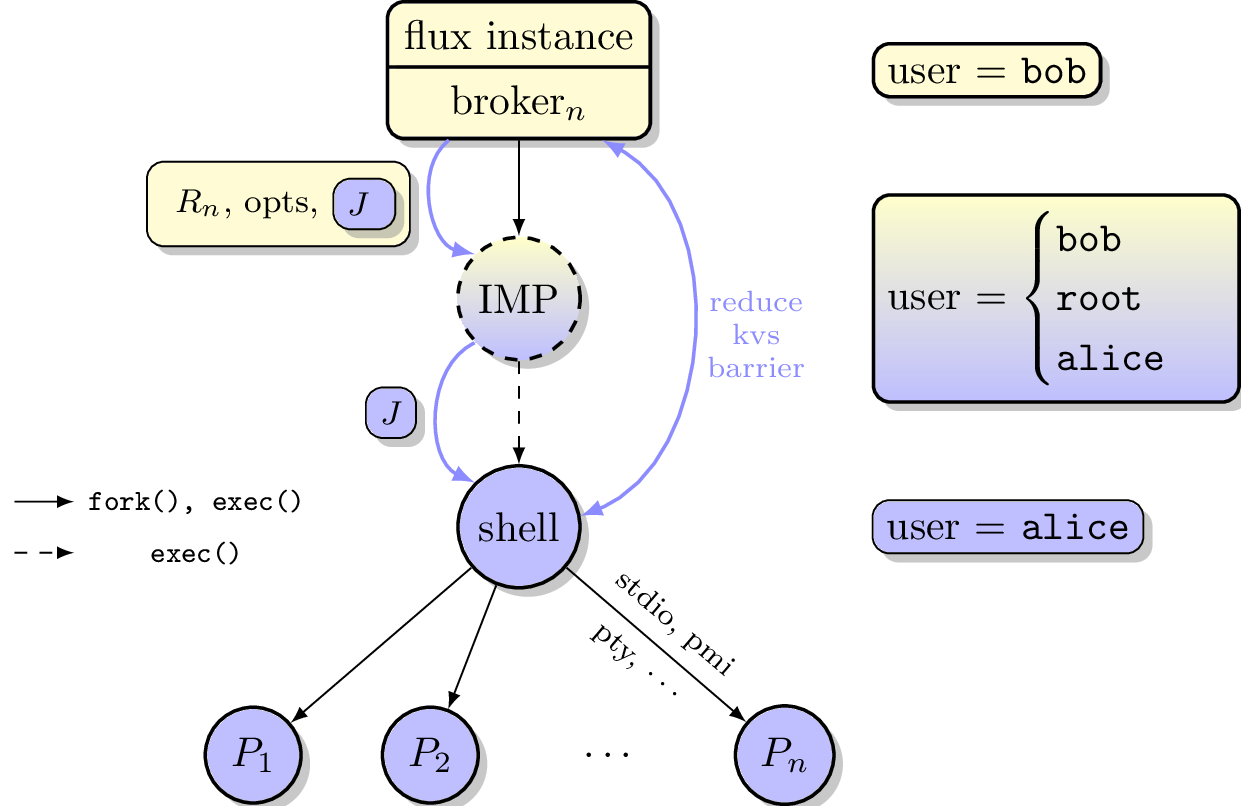
Depiction of multi-user Flux IMP overall design. Here user bob is the instance owner, and alice is a guest.
Input to the IMP
The IMP reads a JSON object as input. The JSON object SHALL contain the following keys:
- J
The User Request (described below).
- options
An OPTIONAL object containing options supplied by the resource owner (described in Resource Owner Options below).
The IMP MAY obtain its input via a helper program rather than reading
directly from standard input. If the environment variable
FLUX_IMP_EXEC_HELPER is set, the IMP SHALL execute the named program
and read the JSON input object from the helper’s standard output. The use
of a helper frees the IMP’s standard input for use by the job shell and
allows the input to be obtained from a trusted source such as the Flux
broker KVS. The helper is executed in the unprivileged child of the IMP
and its output is subject to the same validation as input read directly
from standard input.
\(J\) is the User Request, which SHALL contain
Jobspec as per 14/Canonical Job Specification
Options supplied by guest user
Guest user uid or username
Job shell path
UUID
Timestamp and TTL
Intended recipient (instance owner)
Allowed resource set
User signature (of above fields)
Where above fields have the following specific meanings and requirements
Timestamp and TTL signifies that the request in question SHALL only be valid between Timestamp and Timestamp+TTL. This puts a time horizon on usage of \(J\).
UUID is a globally unique identifier
Intended recipient is set to the instance owner that is the target of the request. This ensures that the user’s request cannot be used by another arbitrary user.
The user signature signs all fields of \(J\).
The job shell path is an absolute path to a job shell which will act as interpreter of the Jobspec in \(J\). If missing, a default will be supplied by IMP configuration.
Resource Owner Options
The options object in the IMP input MAY contain any of the following keys. The resource owner is trusted, therefore these options do not require a user signature. Unrecognized keys SHALL be ignored.
Device Containment
Two optional keys control device access for the job shell and its descendants.
- DevicePolicy
A string specifying the device access policy. Recognized values are:
"auto"(default)If DeviceAllow is absent or empty, allow all devices. Otherwise behave like
"closed"."closed"Permit access to a baseline set of safe pseudo-devices (listed below) plus any devices explicitly listed in DeviceAllow. All other device access is denied.
"strict"Permit access only to the devices explicitly listed in DeviceAllow. The baseline pseudo-devices are not added. All other device access is denied.
If DevicePolicy is absent but DeviceAllow is present,
"auto"SHALL be assumed.- DeviceAllow
An array of
[specifier, access]tuples, each permitting access to one device or device class. The specifier string may be:/dev/...Absolute path to a device node. The major and minor numbers are resolved at policy-application time via
stat(2).char-NAMEAll character devices of the named class, looked up by name in
/proc/devices.block-NAMEAll block devices of the named class, looked up by name in
/proc/devices.
The access string consists of one or more of the characters
r(read),w(write), andm(mknod), in any order.Example:
"DeviceAllow": [
  ["/dev/nvidia0",        "rw"],
  ["/dev/nvidiactl",      "rw"],
  ["/dev/nvidia-uvm",     "rw"],
  ["/dev/dri/renderD128", "rw"]
]
When DeviceAllow appears in the optional keys, the IMP SHALL apply device containment via a cgroup BPF program attached to the job’s cgroup before executing the job shell. The IMP SHALL always include a set of internal baseline devices deemed required for basic job functionality. The suggested baseline devices are described below.
Note
The DeviceAllow / DevicePolicy keys mirror the names and
semantics of the systemd DeviceAllow= and DevicePolicy= unit
properties. When the IMP is started as a systemd transient unit
(e.g. via sdexec), the FLUX_IMP_EXEC_HELPER helper MAY
read these properties directly from the unit via D-Bus and populate
the options object accordingly. This allows device containment to
be configured in one place (the Flux system configuration) and
enforced either by systemd natively (if and when it gains support for
this in user sessions) or by the IMP as described here.
Baseline Devices
When device containment is active the following devices SHALL always be
permitted, regardless of the DeviceAllow list. This matches the
static device list applied by systemd for DevicePolicy=closed
(bpf_devices_allow_list_static() in src/core/bpf-devices.c,
verified against systemd v260.1; unchanged since v244):
Device |
Access |
Notes |
|---|---|---|
|
rwm |
Null device |
|
rwm |
Zero source |
|
rwm |
Always-full device |
|
rwm |
Random source |
|
rwm |
Non-blocking random source |
|
rwm |
Controlling terminal |
|
rwm |
Pseudoterminal master |
|
rw |
Pseudoterminal slaves (mknod not permitted) |
IMP Internal Operation
Privilege Separation
When the IMP is invoked and has setuid privileges, the process MAY use privilege separation to limit the impact of programming errors or bugs in libraries. For more information on privilege separation, see the paper on privilege separated OpenSSH: “Preventing Privilege Escalation” [1].
Request Verification
Once the privileged IMP process has read its input it SHALL perform the following verification steps:
Verify integrity and authenticity of \(J\)
Verify recipient field in \(J\) matches current real UID of the IMP (i.e. the resource owner)
Verify TTL on \(J\)
The IMP process MAY also perform the following OPTIONAL verification steps:
Verify that the current real UID of the IMP process is the “owner” of the current container.
Verify that the intersection of the assigned resource set and the current container is not empty.
Container ownership verification is considered optional because all non-system-owner processes in Flux MUST be started by the IMP and thus will be placed in inescapable containers. It thus follows that a user running the IMP has ownership of the resources on which the IMP has been invoked. This strategy is described further in the “Resource ownership verification” section below.
Determining the intersection of the assigned resource with the current resource set is considered optional because this check will be a side effect of sub-container creation. If, after all container creation plugins have been run, the container for the job is empty, the IMP will abort with an error. Therefore an initial verification check may be redundant.
Resource ownership verification
Resources in Flux are initially owned by the system owner, i.e. the
user which runs the system instance. Typically, this would be some
special system user, e.g. flux. The system owner is the only trusted
user and resource ownership of requests from this user SHALL NOT require
verification.
In order to verify resource ownership for non-system users, the following requirements should be met:
The IMP SHALL support some sort of containment strategy, implemented via plugins for maximum flexibility.
The IMP’s container mechanism MUST support, at a minimum, process tracking functionality capable of creating inescapable process groups.
The IMP’s container strategy MUST be hierarchical, such that containers for jobs within an instance are created as sub-containers of container of the parent.
With the following requirements met, the IMP may verify resource ownership by ensuring that the current container includes the resources in the assigned resource set, and that the invoking user is owner of the current container.
Revoking resource ownership
Resource ownership MUST be revokable. The result of a revocation SHALL include termination of all processes currently running in the container associated with the revoked resource grant. A revocation is recursive, and removes the container and all child containers, including ancillary data.
IMP post-verification execution
After verification of input is complete, the flux-imp executable invokes required job setup code as the superuser. This setup code MAY be implemented as system-installed and verified plugins, and MAY include such things as
Start a PAM session on behalf of the guest
Execution of some sort of job prolog
modification of system settings
creation of directories
state cleanup
optional behavior
Once privileged setup is complete, the security IMP SHALL generate a log message or other audit trail for the individual request. The IMP then SHALL spawn the job shell path specified in \(J\), or a IMP configuration default with the guest user credentials.
The IMP MUST remain active while the job shell executes and forward any signals it receives to the shell as described below. The IMP MAY remain active until its cgroup is empty, if applicable. Once its signal forwarding role is complete, the IMP MAY perform privileged clean-up tasks such as
Finalize the PAM session
Other IMP operational requirements
A multi-user instance of Flux not only requires the ability to execute work as a guest user, but it must also have privilege to monitor and kill these processes as part of normal resource manager operation.
Signal Handling
The IMP runs with an effective user ID of root and a real user id of the system instance owner, thus the system instance owner is permitted to signal the IMP. In contrast, the system instance owner is not permitted to signal guest user processes.
To enable the instance owner to signal guest jobs, the IMP SHALL act as a proxy for the job by trapping common signals and forwarding them to the job shell.
To enable the instance owner to fully clean up when the job shell is unable to do so, the IMP SHALL handle SIGUSR1 as a surrogate for SIGKILL. Upon receipt of this signal, the IMP SHOULD deliver SIGKILL to all processes in the job’s container, including the job shell.
The IMP SHALL get the basename of the current cgroup directory at startup.
If the directory begins with imp-shell, then the IMP SHALL deliver SIGKILL
to all PIDs listed in cgroup.procs. Otherwise, the IMP SHALL deliver
SIGKILL only to its direct child and optionally MAY include descendants.
Note
The default system instance configuration is to launch the IMP as a direct child of the broker, in the broker’s cgroup.
Flux MAY be configured to run jobs in a flux owned systemd user
instance, enabling jobs to persist across a Flux restart. In this case
the IMP, and hence the job, SHALL be started as a transient unit whose
name begins with imp-shell, in its own cgroup.
Privileged administrative actions
A Flux system instance needs to launch select commands with an effective user ID of root to support system prolog, epilog, and housekeeping scripts. The IMP enables this with the flux-imp run subcommand.
For each command that Flux needs to run, the IMP configuration SHALL define the following in order to constrain this capability:
- name
The logical name by which Flux will initiate execution.
- path
The executable path. Command line arguments are not allowed.
- allowed-users
A list of users that are allowed to invoke this command. Normally this is set to the
fluxuser.- allowed-environment
A list of environment variables or glob patterns that are allowed to be passed through to the executable. By default, only
FLUX_JOB_IDandFLUX_JOB_USERIDSHALL pass through.
To enable the instance owner to implement execution timeouts, the IMP SHALL linger while these commands execute and act as a signal proxy by trapping common signals and forwarding them to the direct child, with SIGUSR1 acting as a surrogate for SIGKILL as described in Signal Handling.
Note
Flux MAY be configured to run prolog, epilog, and housekeeping scripts as one-shot systemd services, which enables them to persist across a Flux restart and run in a dedicated cgroup.
This is accomplished by configuring Flux-provided wrapper scripts as the administrative executable. The wrapper scripts trap SIGTERM and run systemctl stop, which tells systemd to terminate [2] all processes in the unit’s cgroup.
SIGKILL SHOULD be avoided in this configuration as it would only terminate the wrapper script, not the systemd unit
IMP configuration
On execution, flux-imp SHALL read a site configuration file which MAY contain site-specific information such as paths to trusted executables, plugin locations, certificate authority information etc. The IMP SHALL check for correct permissions on all configuration files to reduce the risk of tampering.
Specific Defenses
This section describes some attacks and their specific defenses. It is still a work in progress.
Executing arbitrary process as another user: The entirety of a user job request, including executables, arguments, working directory, environment variables, etc, has an integrity guarantee, therefore a request cannot be forged, even by the instance owner.
Replay attacks, where a user’s job request is run again without their express permission, or a request is taken to another system and executed without authority. The intended recipient field of the user request protects against users other than the instance owner using the guest request, and a fixed time-to-live prevents the request from being used indefinitely. Finally, flux-imp` logs all invocations, thereby allowing replays to be detected and audited.